Use cases and pricing

Live reports and information from every shared space

Connect people in shared spaces with the teams who manage them—to report something that needs action now, or to share feedback and information you review later.

Create Live, Info or Choice QR codes for urgent reports, assistance, feedback and local insight. Route every response to the right team and turn it into useful intelligence.

Create · Promote · Report · Respond · Learn

  1. 1. Create

    Build a tailored reporting campaign and choose what information you need to collect.

  2. 2. Promote

    Generate location-specific QR codes and use AI to help create posters and campaign materials.

  3. 3. Report

    Anyone can scan and either report something now or share information about the place—without an app or account.

  4. 4. Respond

    Live reports reach the team on duty instantly; information lands in the insights inbox—both with location and relevant context included.

  5. 5. Learn

    Track compliments, actions and resolutions, identify patterns and use the intelligence to improve future decisions.

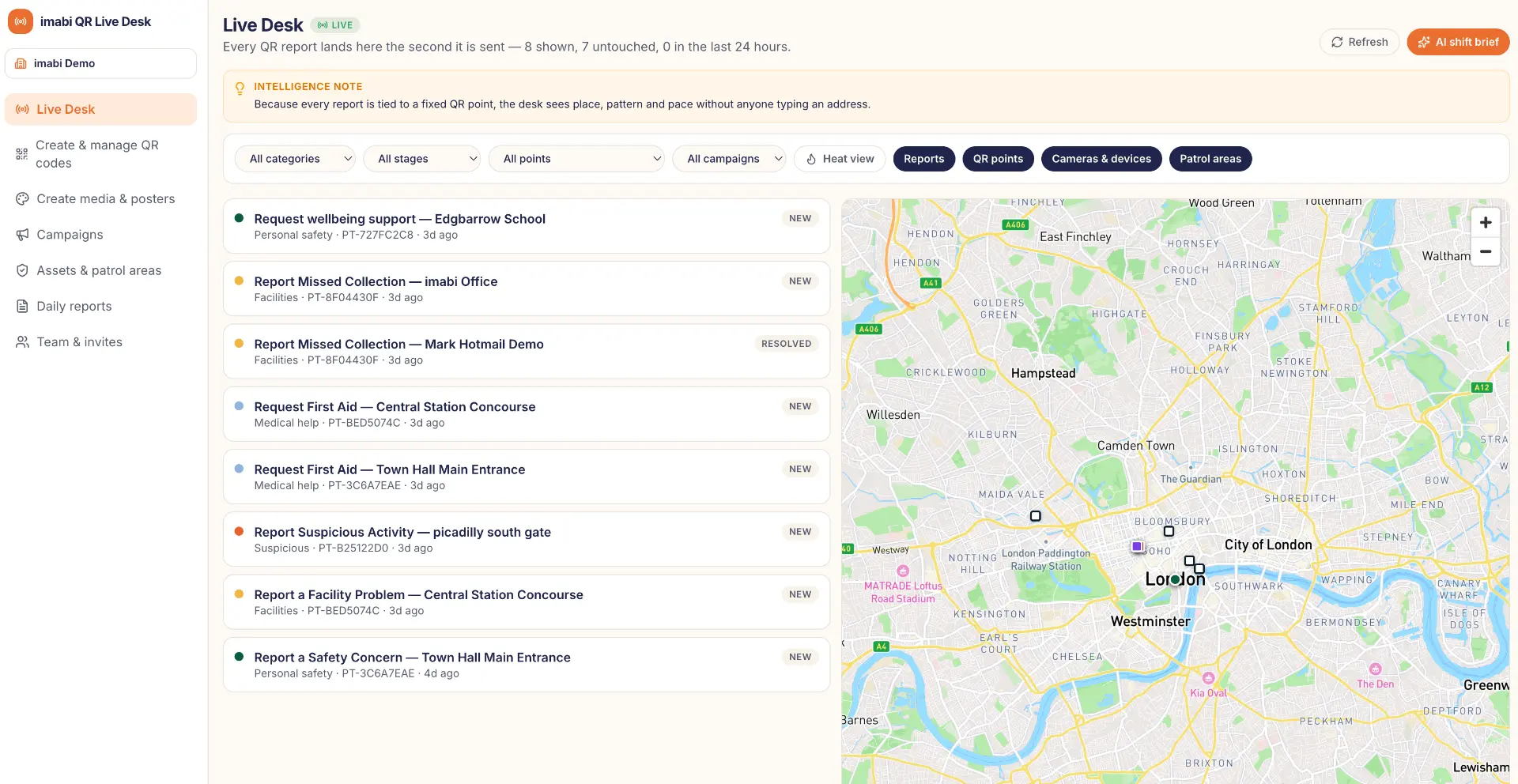
Privacy-safe imabi Live Desk showing incoming reports plotted on a live operational map

Three types of QR code

Report something now, or share information for later

Not every scan is an emergency. When you create a QR code you decide how it will be used—Live, Info or Choice—and the reporting screen, the poster wording and the Live Desk inbox all follow that choice.

Live

We respond now

For places where someone may need help straight away. The person reports in a few taps and it goes directly to the team on duty, with the location already attached.

Where it lands
Urgent queue on the Live Desk
Poster banner
“Report now — we respond live”

Best for

  • Assistance and accessibility requests
  • Spills, hazards and faults
  • Welfare and urgent concerns

Info

Feedback, reviewed later

For gathering information about a place. People answer a few short questions, add a suggestion or praise the team, and your staff review it when it suits them. It is clearly not monitored live.

Where it lands
Insights inbox on the Live Desk
Poster banner
“Tell us — feedback reviewed later”

Best for

  • Compliments and suggestions
  • How a place is used and when
  • Cleanliness, lighting and facilities

Choice

Let the person pick

One code, two routes. The person chooses “I need help now” or “Tell us about this place”, and each answer goes to the right inbox automatically.

Where it lands
Urgent queue or insights inbox, depending on the choice
Poster banner
Neutral wording that offers both options

Best for

  • Entrances and busy public areas
  • Sites where needs vary through the day
  • One poster for every kind of message

Honest promises

AI poster wording never promises a live response on an Info code.

Two inboxes

Live reports reach the urgent queue; information builds up in the insights inbox.

Mix and match

Use different types at different locations within the same campaign.

Core capabilities

Everything you need in one place

imabi provides a complete self-service platform for creating, promoting, receiving and managing live reports and information.

Create your campaign

Tailor the reporting experience to your organisation, audience and locations.

Generate your QR codes

Create unique Live, Info or Choice QR codes for individual sites, areas, assets or campaign touchpoints.

Promote with AI

Use AI assistance to create clear posters, signs and digital promotional materials.

Route every response correctly

Decide which customer service, operational or specialist team should receive each type of feedback, request or report.

Manage reports and information

Live reports reach the urgent queue and information reaches the insights inbox—review, assign and resolve both through the imabi Live Desk.

Understand the bigger picture

Use maps, heatmaps and analytics to identify recurring issues, busy locations and emerging patterns.

Live Desk

Manage every response live

  • An urgent queue for live reports and an insights inbox for information
  • Live maps and heatmaps
  • Filters by issue, location, campaign and status
  • Verified information about each location
  • Clear triage and status tracking
  • Direct responses to people requesting updates
  • Action and resolution records
  • A clear operational audit trail

AI support

Support for the team receiving each response

  • Summarises each report or piece of information
  • Identifies whether it is feedback, assistance, an operational request or an urgent report
  • Recommends suitable actions
  • Suggests priorities, owners and timescales
  • Considers verified information about the location
  • Drafts responses and resolution records
  • Produces live shift briefings
  • Highlights positive themes, recurring requests and emerging issues

Sector selector

Find your use case

Choose a sector to see how imabi connects people with customer experience, operational and specialist teams—and what a deployment typically costs.

Festivals and events

Connect festivalgoers with guest services, welfare and operational teams

The problem

At a busy event, visitors may want to praise a helpful team member, request accessibility or welfare support, find lost property, suggest an improvement or flag an urgent issue. Finding the right team in the moment can be difficult.

Privacy-safe imabi Live Desk demonstration for Festivals and events, with a live map and tailored feedback, assistance and operational feed

Live responses

Festivals and events

Live
  1. Staff compliment: Exceptional help

    New
    Positive

    Entrance Info Point

    Routed to Guest services

  2. Accessibility request: Viewing platform

    Assigned
    Assistance

    Main Stage Arena

    Routed to Accessibility

  3. Lost property: Bag handed in

    New
    Operational

    Welfare Zone

    Routed to Guest services

  4. Heat exhaustion: Medical support

    Review
    Urgent

    Bar Tent East

    Routed to Medical

The reporting journey

  1. 1

    Create

    Build a tailored reporting campaign and choose what information you need to collect.

  2. 2

    Promote

    Generate location-specific QR codes and use AI to help create posters and campaign materials.

  3. 3

    Report

    Anyone can scan and either report something now or share information about the place—without an app or account.

  4. 4

    Respond

    Live reports reach the team on duty instantly; information lands in the insights inbox—both with location and relevant context included.

  5. 5

    Learn

    Track compliments, actions and resolutions, identify patterns and use the intelligence to improve future decisions.

Festival site QR touchpoints

6 QR touchpoints
1EntranceQR CODE ZONE2Main stageQR CODE ZONE3BarQR CODE ZONE4ToiletsQR CODE ZONE5CampsiteQR CODE ZONE6Welfare areaQR CODE ZONE
  • Touchpoint 1

    Entrance

  • Touchpoint 2

    Main stage

  • Touchpoint 3

    Bar

  • Touchpoint 4

    Toilets

  • Touchpoint 5

    Campsite

  • Touchpoint 6

    Welfare area

Step 1 — client setup

Set up your campaign and reporting journey

Create your campaign, generate its QR codes, promote it with AI and configure how every response reaches the right team in the imabi Live Desk.

  1. Step A

    Create your campaign and generate your QR codes

    Tailor the reporting experience to your organisation, audience and locations. Create unique QR codes for individual sites, areas, assets or campaign touchpoints, and define each one as Live, Info or Choice.

    • Location-tagged Live, Info or Choice codes, each with its own one-tap screen
    • Custom question flows, category selectors and branded intake forms
    • Scan tracking with live dashboards and direct routing to the right team
    • Live, Info or Choice
    • Branded intake
    • Custom question flows
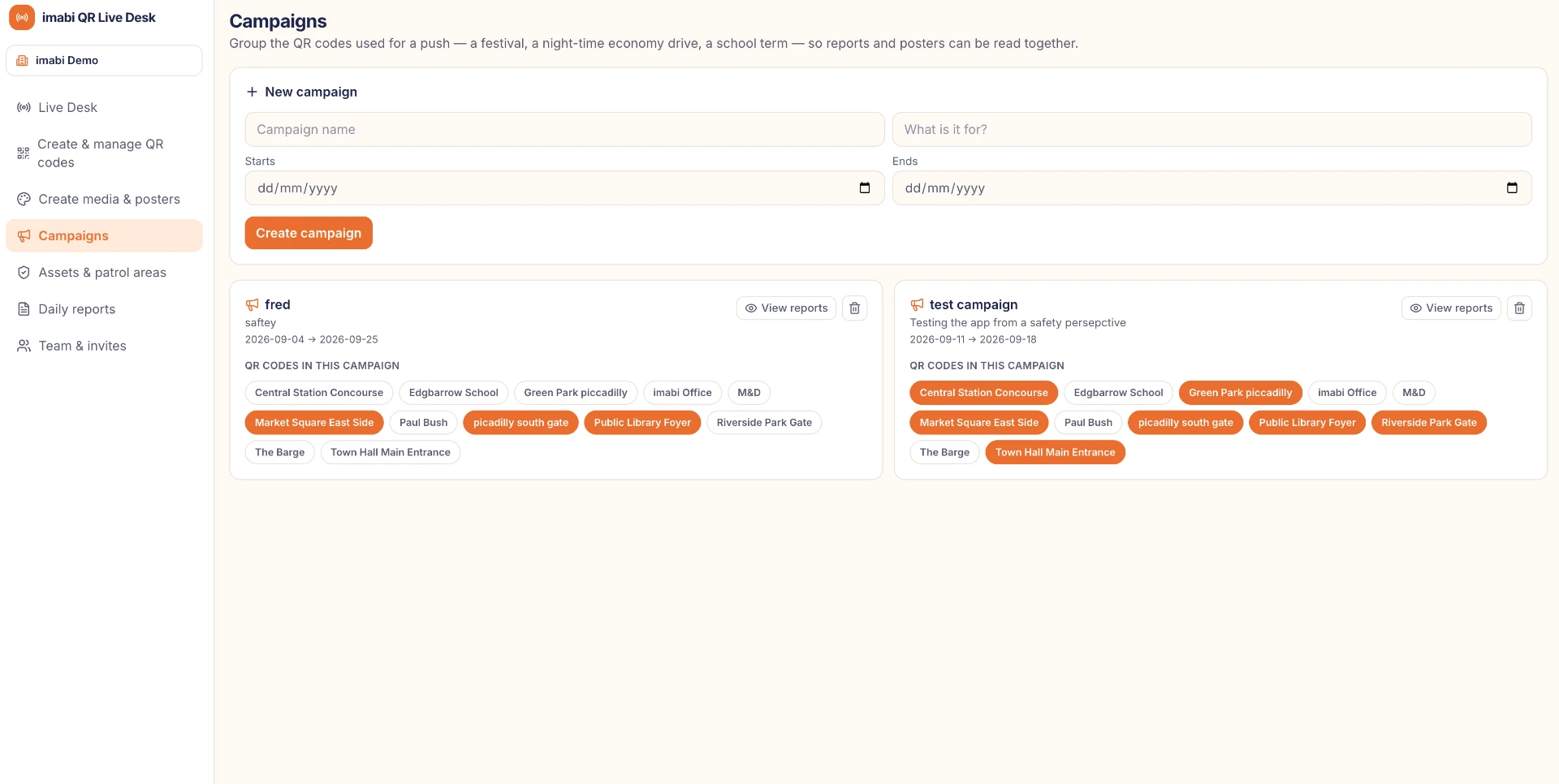
    imabi Live Desk campaign list showing live reporting campaigns and their QR codes; client-specific names and locations are privacy protected

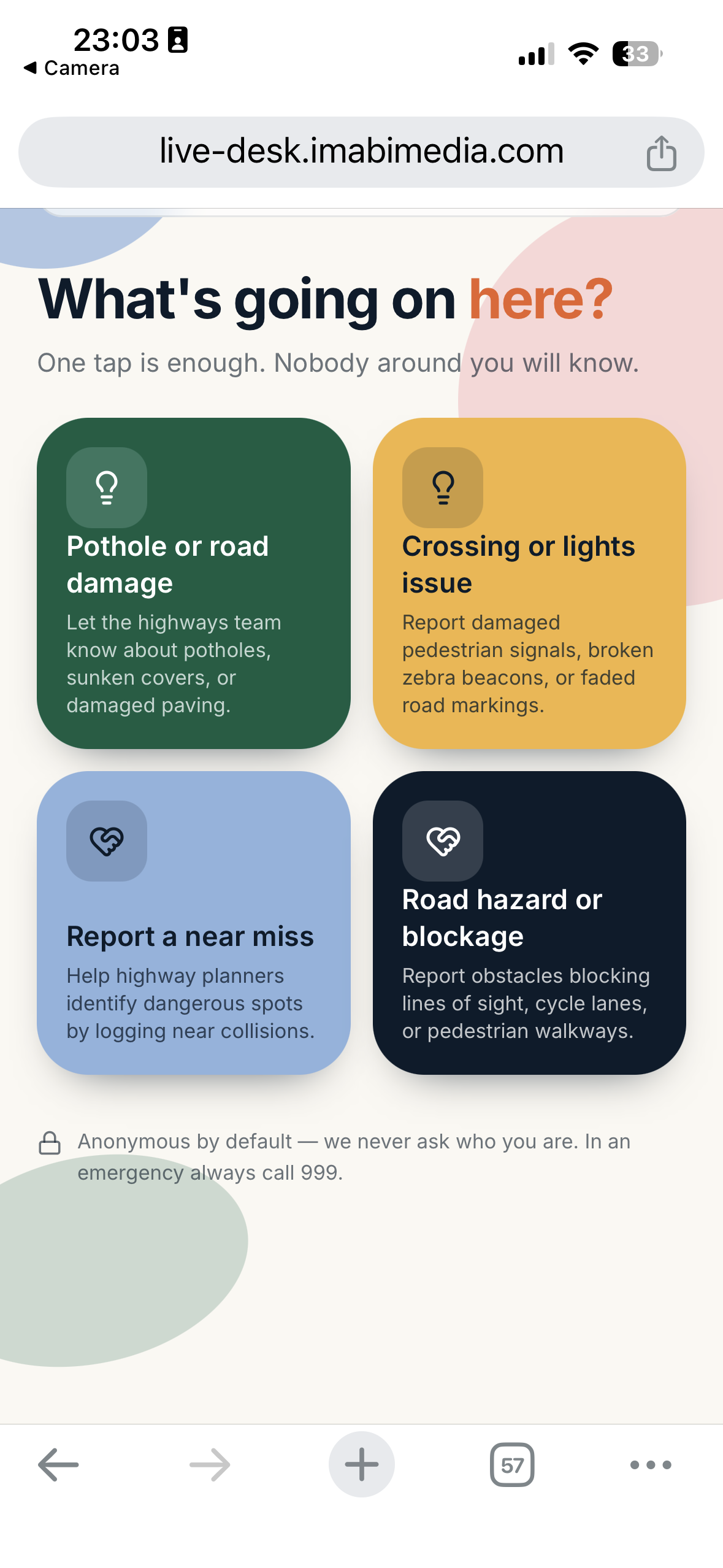
    Scanning the QR code opens

    imabi one-tap mobile reporting screen in the browser, with category choices tailored to the selected sector
    • Medical & welfare

    • Stage & sound

    • Cleanliness & bins

    • Lost property

  2. Step B

    Promote with AI

    Use AI assistance to create clear posters, signs and digital promotional materials.

    • Sector-tailored posters, tent cards and digital displays
    • Wording and banner matched to the QR type, so Info posters never promise a live response
    • Instant print-ready export in multiple formats
    • AI-generated media
    • Print-ready export
    • Multi-format assets
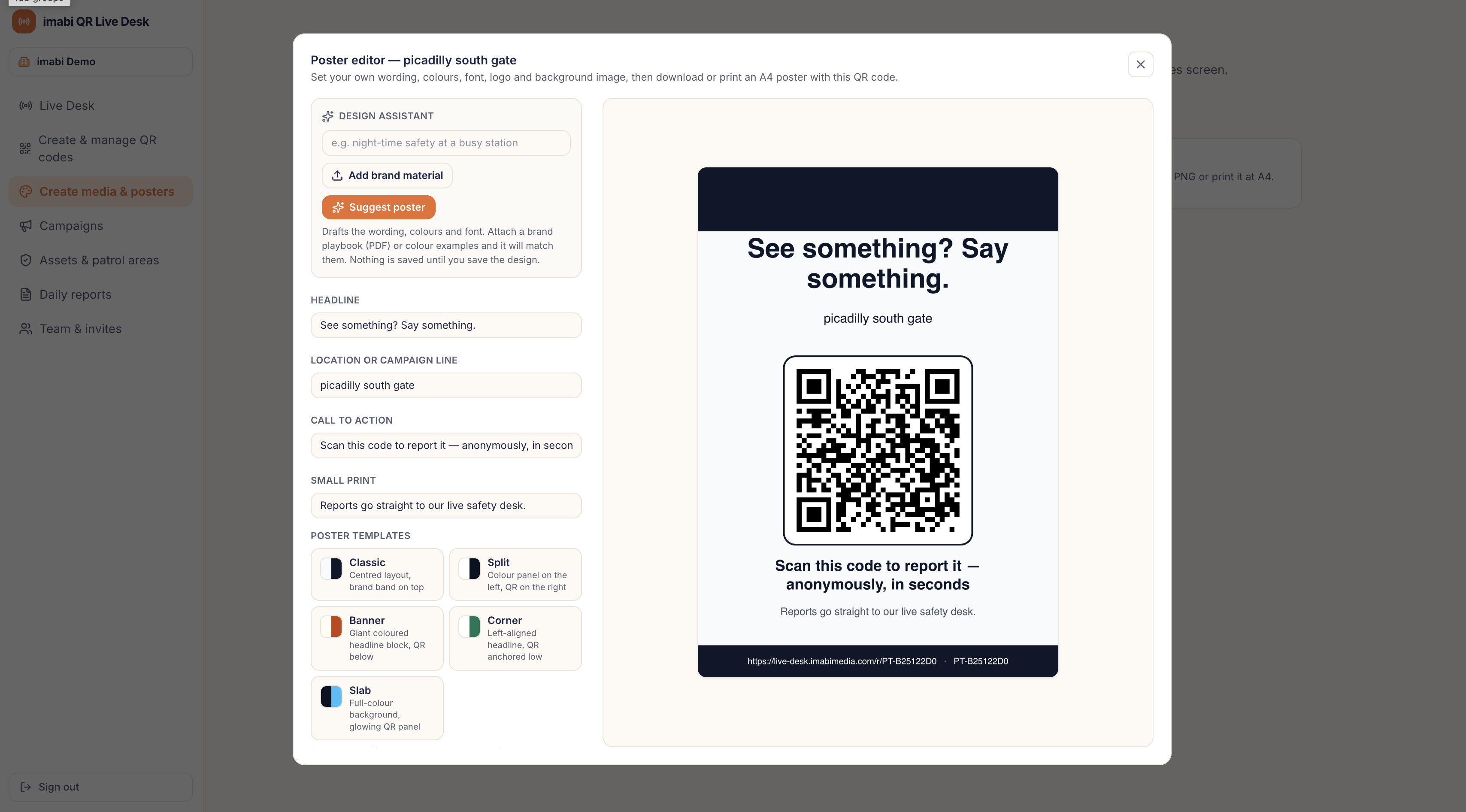
    imabi Live Desk with the Poster Editor open, showing the Design Assistant, poster templates and live QR poster preview
  3. Step C

    Route, manage and understand every response

    Decide which customer service, operational or specialist team should receive each type of feedback, request or report. Live reports reach the urgent queue and information reaches the insights inbox on the imabi Live Desk; review, assign and resolve both, then use maps, heatmaps and analytics to identify recurring issues, busy locations and emerging patterns.

    • CCTV zones, help points, first aid and welfare hubs
    • Defibrillators and security patrol areas on one map
    • Reports cross-referenced with nearby assets automatically
    • CCTV cross-referencing
    • Support asset map
    • Patrol areas
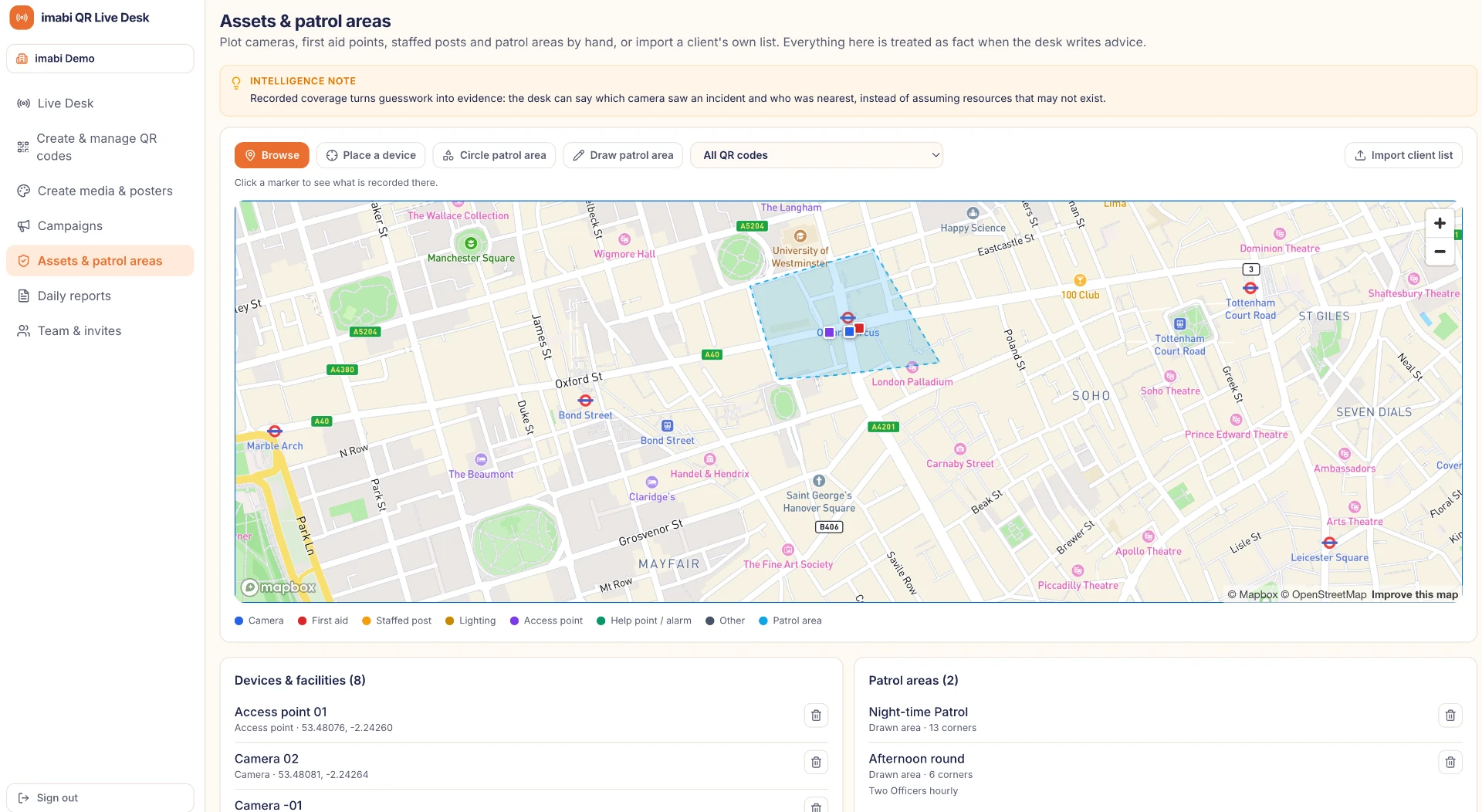
    imabi Live Desk map showing assets and patrol areas plotted across a site

User stories in action

See the workflow through every role

Choose a role to follow feedback, assistance or an operational need from the first action through imabi intelligence to a clear outcome.

The need

Visitor / Festivalgoer
No app required
“As a visitor, I need a quick way to request help, share feedback or report an issue without downloading an app.”
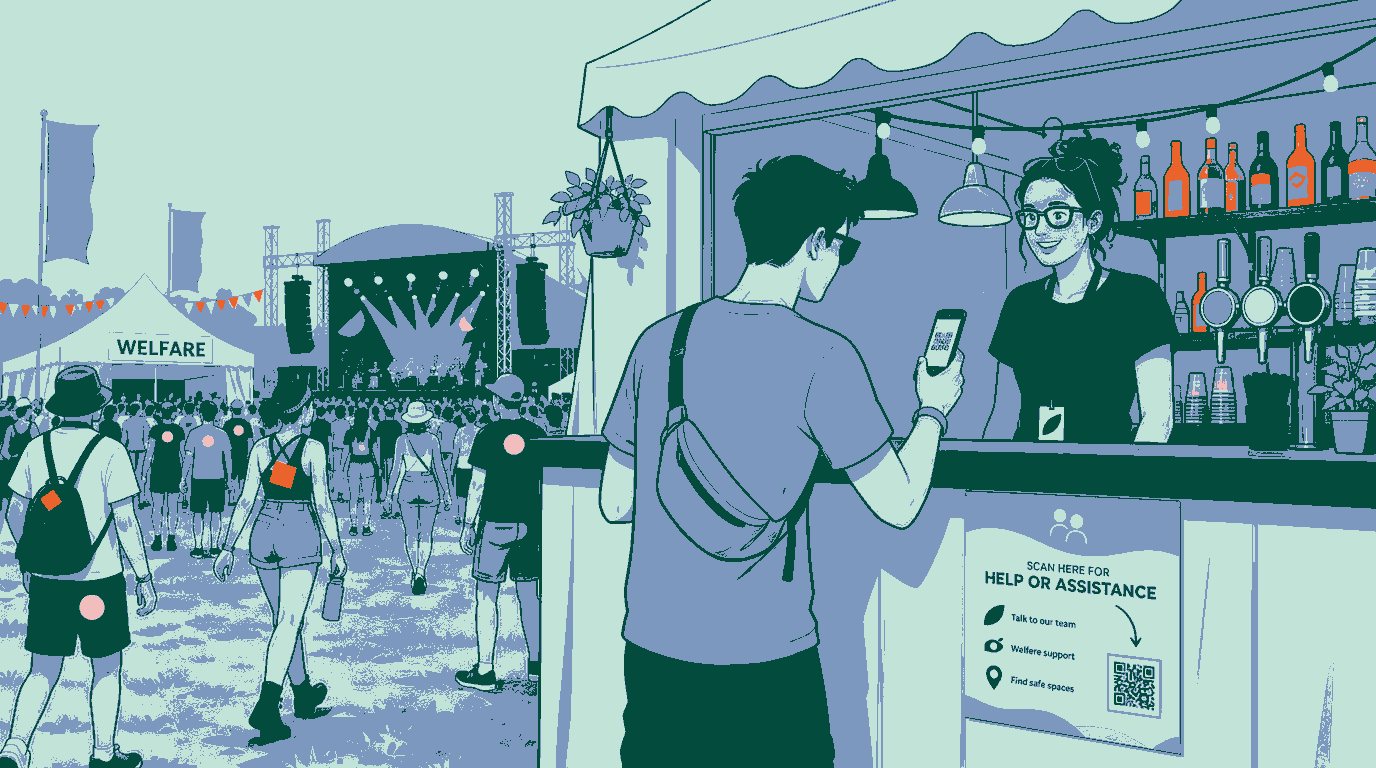
Illustration of a festival attendee scanning an imabi assistance poster attached to a bar beside the main stage and welfare hub
Visitor / FestivalgoerStory 01

Scenario in action

No app required

Stage 1

Trigger / action

Scans the nearest QR code and chooses feedback, assistance or report an issue.

Stage 2

Platform intelligence

imabi captures the reporting point and routes the message without requiring an app.

Stage 3

Resolved outcome

The right on-site team receives a clear, location-aware response.

Key benefits

  • Location-specific reporting
  • Routing to security, welfare, medical or operational teams
  • Live activity map
  • AI-supported prioritisation
  • Hotspot and cluster identification
  • Post-event reporting

Pricing

From £45 + VAT per QR point

£15 per QR point per day with a 3-day minimum, so 3 days is £45 per QR point. Each extra day is £15. One-off, with no subscription and no setup fees.

What is included

  • Campaign setup
  • Location-specific QR codes
  • AI-assisted poster content
  • Live Desk access
  • AI recommendations
  • Reporting and resolution records
  • Post-event summary

Pricing

Simple pricing

One QR point, one price. Nothing to choose between.

One QR point, one price

£29+ VAT per QR point per month

  • Two-way replies by email and text
  • AI-assisted advice and resolution notes
  • Live map and dashboard
  • Poster and button designer
  • UK-hosted, GDPR compliant

15% multi-site discount at 10 or more locations.

Festivals and events: from £45 + VAT per QR point — £15 per day with a 3-day minimum. No subscription.

No setup fees. Cancel anytime. Add or remove QR points whenever you need to.

Work out your price

Change the numbers and the estimate updates instantly.

Locations

10 locations × £29 + VAT per QR point per month15% multi-site discount

From £247/month excluding VATsaving £43

Prices exclude VAT. Final pricing is confirmed on a call.

Email this estimate to imabi

Pricing by sector

imabi Live Reporting pricing by sector, excluding VAT
SectorPrice (excluding VAT)Commercial model
Festivals and eventsFrom £45 per QR pointOne-off per event: £15 per day, 3-day minimum
Shopping centres£29 per QR point per monthPer QR point, 15% off at 10+ locations
Schools£29 per QR point per monthPer QR point, 15% off at 10+ locations
Transport£29 per QR point per monthPer QR point, volume packages for networks
Local authorities£29 per QR point per monthPer QR point, 15% off at 10+ locations

All prices exclude VAT. No setup fees. Cancel anytime. Volume packages are available for fleets, transport networks and larger estates.

Not sure which option fits? We will provide a clear proposal based on your locations, users and reporting needs.

1

Your campaign

2

Your QR codes

3

Your teams

4

Your intelligence

Launch your live reporting campaign

Make it easier for people to share praise, request assistance, suggest improvements or report an issue—and turn every response into useful operational intelligence.

No app. No login. Live in minutes.

Prefer email? Write to hello@imabi.com.

We reply to every enquiry from hello@imabi.com.